loading.. Please Wait

How to Set a Master Password

  • Last Created On Dec 22, 2025
  • 37

To set or change a master password, go to the USER’S MENU > SYSTEM SETTINGS > GENERAL SETTINGS. Type the combination you chose in the blank field and hit “Save”.

The master password allows you to login using any registered user’s email. For example, you can access the system with an owner’s email address and check the information available to them.

Important: This is an administrative-only master key that allows you to access all the information in the system and, therefore, should not be shared.
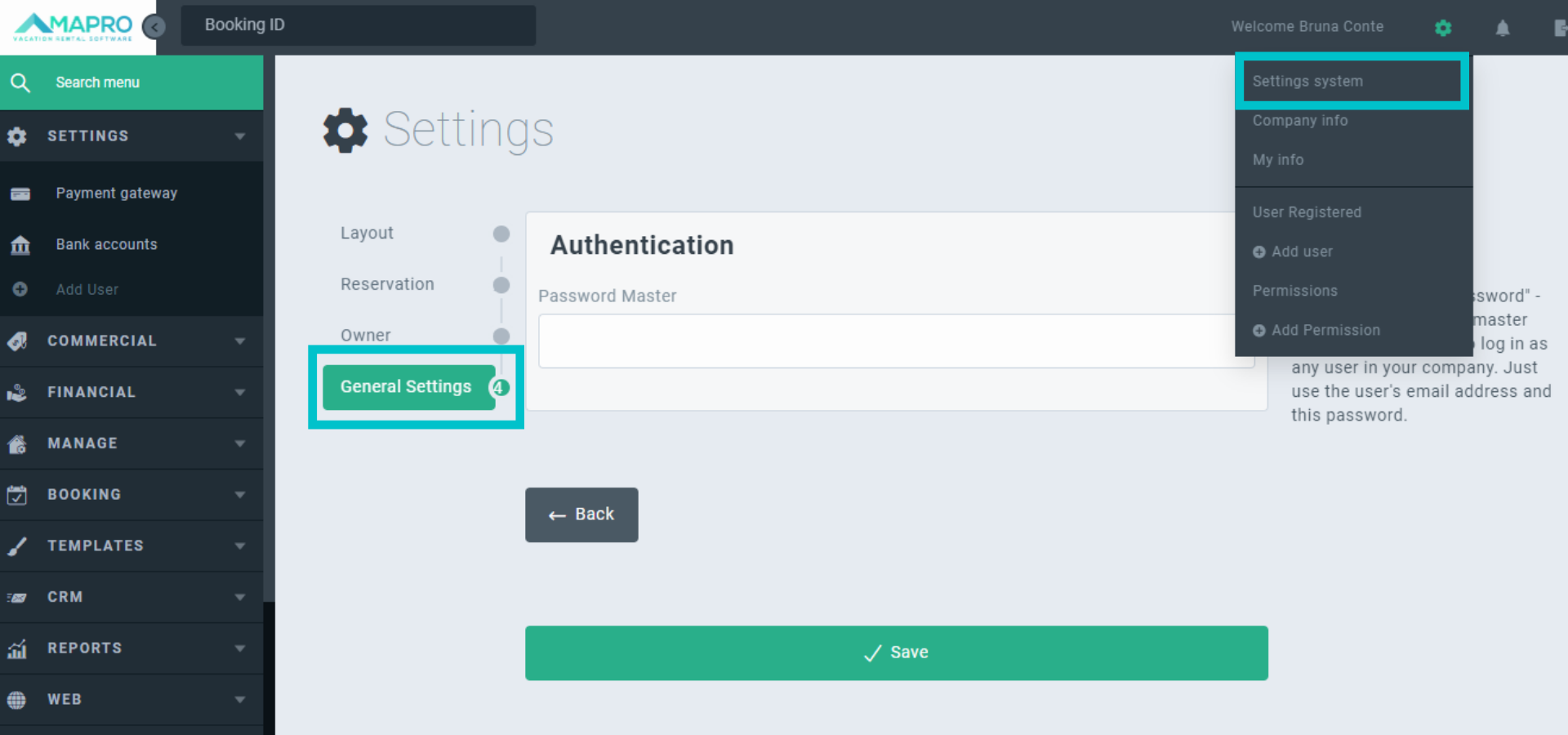
MAPRO_-_master_password_pt__1_.png


Choose “Save” if you have finished editing, or “Back” to return to “Owner”.

Views: 37

Recent Articles

  • How to Save the Guest's E-mail Address i...
    42
  • How to Register an External iCal in MAPR...
    37
  • How to Migrate Payments from One Reserva...
    45
  • How to Find the iCal of a Property Regis...
    40
  • How to Set Early Check-in and Late Check...
    52

Popular Articles

  • How to Upload the Airbnb Payout Spreadsh...
    160
  • How to Process Payments of Non-recurring...
    82
  • How to Cancel VRBO Reservations
    78
  • How to Configure your Airbnb Listing to...
    73
  • Short-Term Rental Agreement
    54
